In short: pick the format by how precisely the content must sit in the real world, then budget for the site itself, because lighting, crowds, signal and venue permission decide whether location-based AR works far more than the 3D asset does.
We have worked on location-based AR at three very different scales: a dragon on Snap Map for the House of the Dragon launch, a world-locked character on Tower Bridge built as an R&D proof of concept for Oraar Studio, and a six-stop WebAR trail across Chester Zoo. Each one taught us that the place is the brief. This guide is for brand marketers, event producers and venue teams deciding which format fits, and what to plan for before anyone opens Lens Studio.
Location-based AR comes in five formats, sorted by precision
The useful way to compare location-based AR experiences is by how accurately they know where the user is standing. That single variable drives cost, testing time and what the creative can promise.
| Format | Precision | Best for | Complexity |
|---|---|---|---|
| Landmark and city-scale lenses | Locked to a mapped structure | Launches, tourism, entertainment IP | High |
| GPS and geo-triggered AR | Metres, not centimetres | Discovery, city hunts, rewards | Low to medium |
| AR trails at venues | Per stop, usually marker-based | Zoos, attractions, festivals, campuses | Medium |
| Marker-triggered on-site AR | Locked to a printed or physical target | Posters, plaques, packaging, exhibits | Low |
| Custom Locations on Spectacles | Locked to a scanned space | Museums, installations, guided visits | High |
Landmark and city-scale lenses put content on real architecture
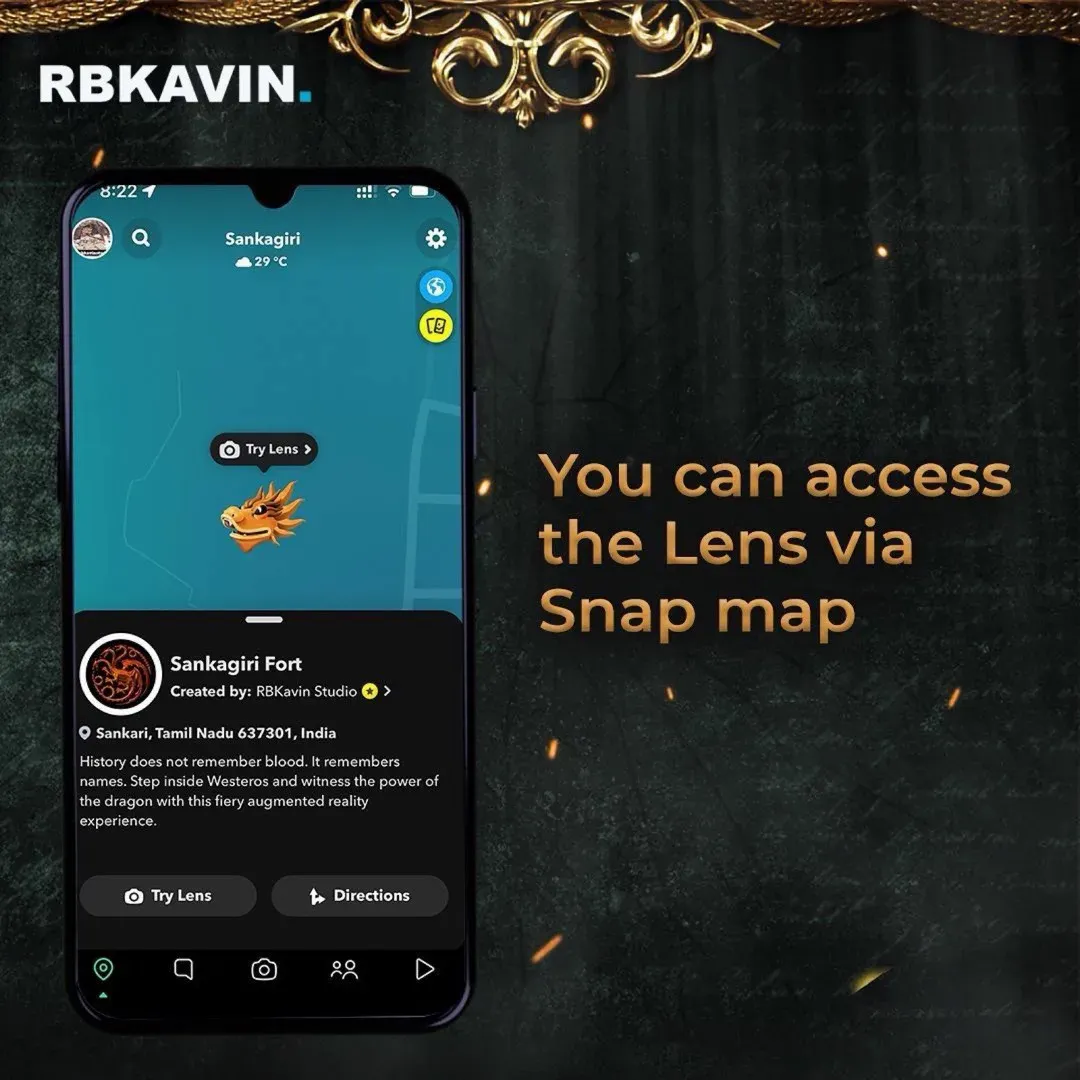
Snap's location AR tools let a lens recognise a real structure and attach content to it, so a character can sit on a specific building and stay there as the user walks around. Snap describes three routes in Lens Studio: Landmarkers built on its library of pre-mapped landmarks, City-Scale AR templates for a small set of mapped city areas, and Custom Location AR, where the creator scans a site with a dedicated lens and imports the resulting mesh. On Snapchat, these lenses can also be surfaced through Snap Map, which is what turns a lens into discovery: the user opens the map, sees something nearby, and goes to it.
Our House of the Dragon lens for HBO and Snapchat used this format. A sleeping dragon was anchored to Sankagiri Hill Fort and woke only when the user moved close enough. It was part of Snap's global campaign of roughly 20 Landmarker lenses across 10+ countries and logged 100K+ impressions during premiere week. The full story is in our behind-the-build write-up and the case study.
Real constraints
- Size and surface. Snap's Custom Location AR docs say the feature currently targets structures up to three metres high, and to avoid moving objects and shiny or reflective surfaces when scanning.
- Paid distribution. Snap's docs state that Lens Cloud features, which include Custom Location AR, cannot currently be used in Sponsored Lenses. Plan organic or Snap Map discovery, not a paid Lens buy, if the idea depends on a custom-scanned site.
- Review. Custom Location lenses need an image marker of the real location submitted for approval, or risk rejection. Leave real buffer before a launch date.
- Field testing. On Tower Bridge AR, an R&D proof of concept Kavin directed for Oraar Studio in 2023, the desktop rehearsal looked stable. On site, tracking instability, lighting changes and device variance only showed up in person, and tracking broke down on lower-end phones. We now treat a mid-range phone as the reference device from day one.
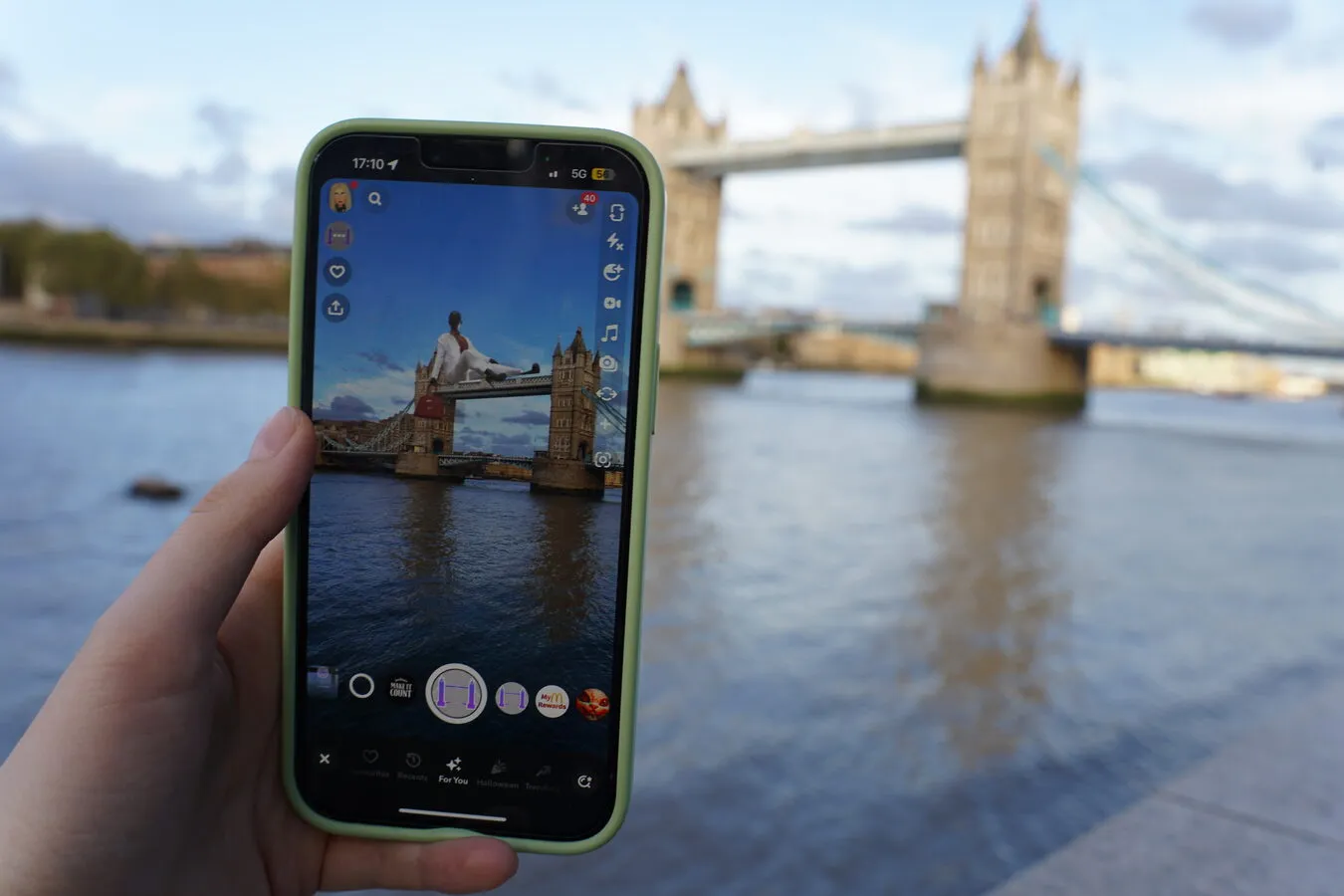
Rough complexity: high. Budget for scouting, scanning, at least two on-site test rounds and platform review. For context, our AR cost guide puts Snap Map location-aware experiences from $15,000, often above $30,000.
GPS-triggered AR is good for discovery, bad for precise placement
Geo-triggered AR uses the phone's location to trigger content inside a radius: a reward appears when you reach a store, a creature spawns somewhere in a park, a clue appears at a street corner. It is the cheapest way to tie a campaign to many places at once, because nothing is scanned.
The trade-off is accuracy. GPS.gov reports that GPS-enabled smartphones are typically accurate to within about 4.9 metres under open sky, and accuracy drops near tall buildings, bridges and trees. That is fine for "you are near the store" and wrong for "the logo sits on this exact window". Treat GPS as the trigger, then let the phone's world tracking place the content on the ground in front of the user.
Real constraints
- Set trigger radii generously, especially in dense streets, or users stand in the right spot and nothing happens.
- Location permission prompts lose people. Explain why you need it before the system dialog appears.
- Never place triggers on roads, private property or anywhere that pulls people into unsafe spots.
Rough complexity: low to medium. The work is in the content and the map of trigger points, not the tracking.
AR trails turn a whole venue into the experience
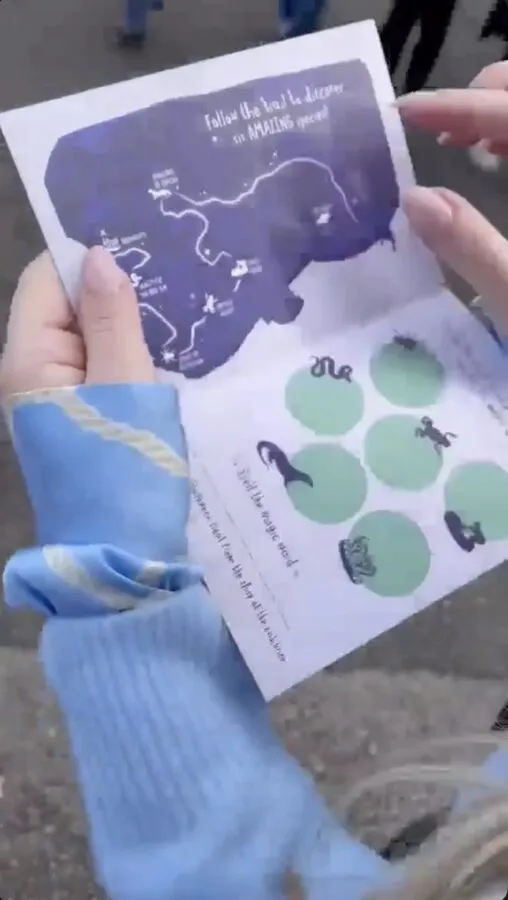
An AR trail links several stops across a site into one journey with a reason to finish. For Chester Zoo with Augit, we built Luna's Lost Spell, a Halloween WebAR trail: six stations, six AR encounters, six letters that spell a magic word, and a physical gift for finishing. It started from a QR code on a printed trail map handed out at the entrance, ran in the browser with no app, and 3K+ kids completed it during Halloween week. See the full case study.
Two things made it work. The printed map did the navigation, so the software did not need to. And each stop used a different interaction, image tracking at one, a face-cam game at another, so the sixth scan felt as fresh as the first.
Real constraints
- Venue sign-off. Every stop is a physical install the venue must approve: placement, signage, accessibility, queue space and who maintains it.
- Signal. WebAR loads over the network. Walk the route with a mid-range phone and check mobile data at each stop. Keep each stop's assets light.
- Weather and wear. Outdoor markers fade, get wet and get stickered over. Print spares and assign someone to check them daily.
- Fulfilment. If the trail ends in a reward, staff need to know how to verify completion at the desk.
Rough complexity: medium. Most of the effort is route design, content variety and on-site logistics. Our WebAR examples for brands cover more no-app builds like this.
Marker-triggered AR is the most reliable on-site format
Marker AR anchors content to a known image or object: a poster, a plaque, a mural, a product, an exhibit label. Because the target is fixed and known, tracking is stable, and the user is told exactly where to point the phone. It suits venue signage, museum labels, out-of-home posters and stadium concourses, which is why it shows up in our guide to AR at stadiums and sports events.
Real constraints
- Glare from glossy laminate or spotlights breaks image tracking. Ask for matte prints.
- Size the marker for the real viewing distance. A small poster at the back of a crowd will not track.
- One marker means one cluster of people. At busy sites, repeat the marker in several places.
Rough complexity: low. A good first location-based project, and live examples are on our WebAR demo portal.
Custom Locations on Spectacles bring mapped AR to smart glasses
Snap's Custom Locations feature lets developers scan a real space with a Custom Locations Lens on Spectacles, then import the mesh into Lens Studio 5.7 or later and build content around it. Snap's docs advise keeping the device in constant, steady sweeping motion while scanning, cap a location group at five locations, and note that adding to an existing scan generates a new ID, so the Lens must be updated to use it. Content stays fixed to the room while the wearer moves, with no phone held up.
This is the right format when the venue controls the devices: a museum gallery, a brand installation, a guided tour where staff hand out glasses. It is the wrong format for mass reach, because the audience is limited to people wearing the hardware. Our guide to smart glasses for museums covers device fleets, charging and staffing, and our wearables practice covers the studio's Spectacles work, including Noodle, a spatial AI workbench for Spectacles that won three prizes at MIT Reality Hack 2026, among them Best Use of Spatial AI (sponsored by Snap Spectacles).
Rough complexity: high. Add device logistics, charging between sessions and staff training to the build.
What actually breaks location-based AR on site
Across every format, the failures we see are rarely the 3D asset. They are the site.
- Lighting. A site scanned at noon can track badly at dusk. Test at the hours the campaign runs.
- Crowds. People walking through the camera view hide the features tracking relies on.
- Signal. Packed venues saturate mobile data. Keep downloads small or offer venue Wi-Fi.
- Permission. Landmark owners, local authorities and venue operators may have rules on filming, signage and commercial use. Clear this before creative is locked.
- Context. The Tower Bridge test showed that casual passers-by do not intuitively understand AR. Signage, a reason to look and a clear first step matter as much as tracking.
- Maintenance. Physical sites change. Scaffolding, new signage or seasonal planting can break a scan or a marker mid-campaign.
Projection is the alternative when you want spectacle without asking anyone to hold up a phone. Our guide to projection mapping for brands covers when that wins.
How to brief a location-based AR experience
A strong brief answers these before a studio quotes:
- The place, named. One site, a list of sites, or anywhere? Do you have permission, or do we need to get it?
- The precision the idea needs. "Near the store" and "on this window" are different formats and different budgets.
- How people find it. Snap Map, a printed map, QR signage, paid social, staff hand-off.
- The platform. Snapchat lens, WebAR in the browser, or Spectacles. This decides reach and whether paid distribution is possible.
- Dates and hours. Live window, time of day and season, so testing matches reality.
- Who maintains it. A named person at the venue for markers, signage and reporting problems.
- The measure. Plays, completions, footfall to a stop, redemptions at a desk.
Location is a creative decision before it is a technical one. On the HBO lens, choosing Sankagiri Hill Fort over a more prominent monument mattered more than any rendering choice. Start there.
Frequently asked questions
What is location-based AR marketing?
Location-based AR marketing is AR content tied to a real place, so it only appears or only works properly at that site. Brands use it to drive people to a landmark, store, venue or event, then reward them with an experience they can only get there. The main formats are landmark lenses, GPS-triggered AR, venue trails, marker-triggered AR and mapped locations on smart glasses.
Which location-based AR format should a brand choose?
Choose by how precisely the content must sit in the real world. If it only needs to appear near a place, GPS triggers are enough. If it must sit on a specific poster or exhibit, use marker AR. If it must sit on architecture, use landmark or custom location lenses, and if the venue controls the devices, consider Custom Locations on Spectacles.
Can a Custom Location AR lens run as a paid Sponsored Lens on Snapchat?
Not at the time of writing. Snap's Lens Studio documentation states that Lens Cloud features, which include Custom Location AR, cannot currently be used in Sponsored Lenses. Plan discovery through Snap Map, the creator's profile, QR codes or on-site signage instead, or choose a format that does not need a custom scan.
How much does location-based AR cost?
It depends on the format. Marker-triggered AR is the lightest build, while landmark and Snap Map experiences need scanning, on-site testing and platform review. Our AR cost guide puts Snap Map location-aware experiences from $15,000, often above $30,000, before media or on-site production.
How accurate is GPS for AR?
Not accurate enough for precise placement. GPS.gov reports that GPS-enabled smartphones are typically accurate to within about 4.9 metres under open sky, and accuracy gets worse near tall buildings, bridges and trees. Use GPS to trigger content near a place, then let world tracking place it in front of the user.
Do we need permission from the venue or landmark owner?
Plan on it. Venue trails and marker AR need physical installs that the venue must approve, and landmark owners and local authorities may have rules on signage, filming and commercial use. Clear permission before creative is locked, not after.
What goes wrong most often with location-based AR on site?
The site, not the 3D asset. Lighting that differs from the scan, crowds blocking the camera view, weak mobile signal, faded or glossy markers and passers-by who do not know AR is there cause most failures. Test on site, at the campaign's real hours, on a mid-range phone.
Insights newsletter
Smart glasses, AR campaigns, spatial computing.
Straight to your inbox. No noise.
SubscribeHave a place in mind?
Tell us the site, the dates and what should happen there. We'll tell you which format fits and what the site will demand.
Start a project