The hardware is real now
I want to start there, because the conversation about smart glasses has been dominated by prototypes and promises for long enough that scepticism has become the default. Snap Spectacles Gen 5 is not a concept. It is a shipping developer platform with a 46-degree stereo colour display, 6DoF world tracking, hand tracking, voice input, and on-device processing. When you put them on and hold your hand up, the system tracks your finger joints in real time. When you look at a flat surface, the plane detection finds it. The display is bright enough to read in indoor lighting. You do not have to apologise for it in a demo.
That matters as a starting point, because the design and development decisions you make are different when the hardware can actually do what you need. Constraints still exist. The battery runs for around 45 minutes. Text legibility gets harder toward the edges of the FOV. Plane detection is not perfect. But these are engineering constraints to design around, not hardware limitations that make the whole category feel pre-release. The platform is ready to build for in a way that it was not 18 months ago.
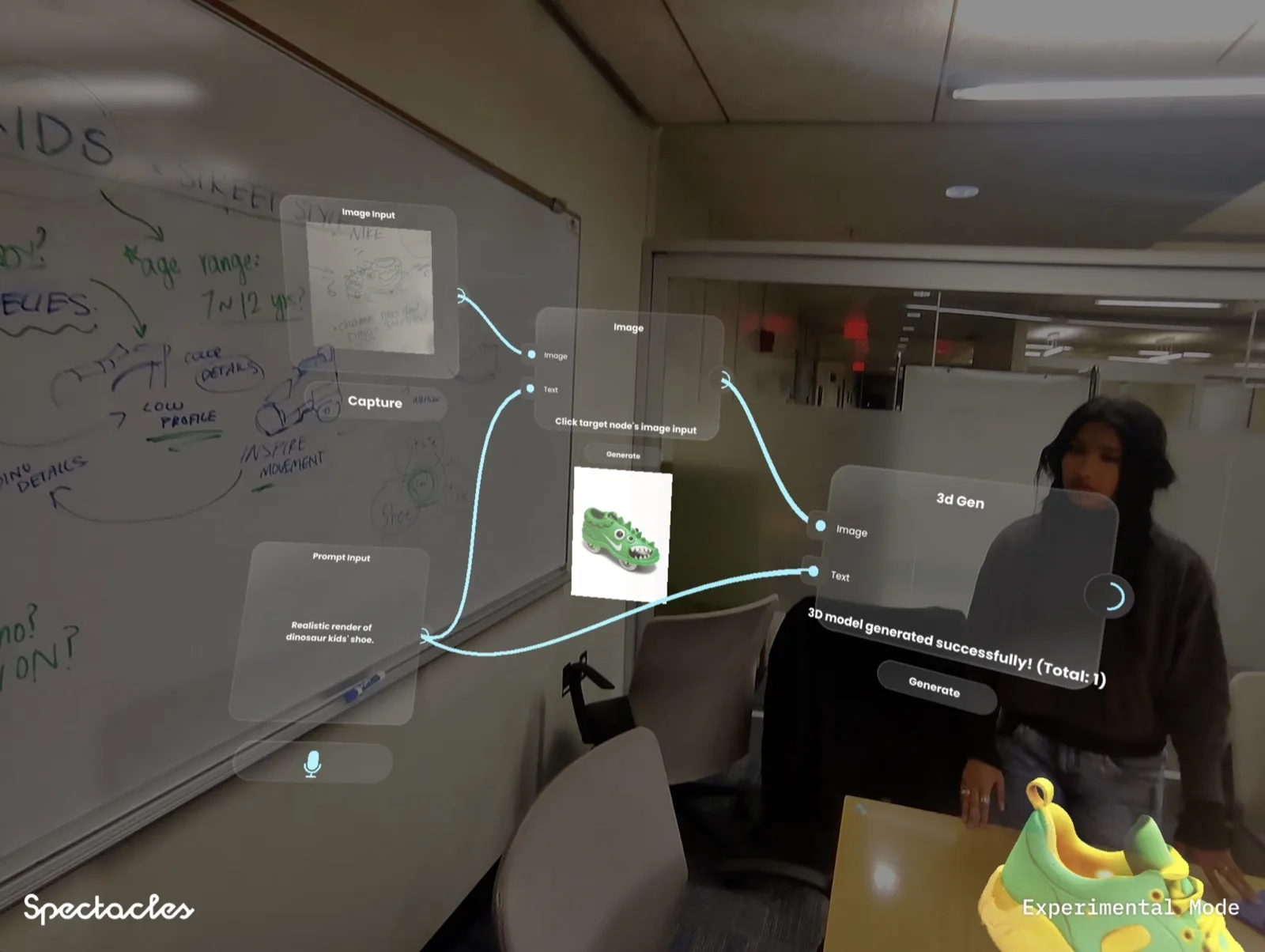
I built noodle on Spectacles at MIT Reality Hack 2026 with my team. It is a spatial AI workbench: a node-based system where you connect AI tools, data flows, and generative outputs as physical nodes floating in the space around you. Think of a visual programming environment, but instead of looking at it on a flat screen, you walk through it. The rest of this article is what building that taught me about the platform, starting with what I got wrong.
The first 48 hours: everything you think you know is wrong
I have been building AR experiences for several years. Lens effects for Snapchat, WebAR activations, phone-based AR for brand campaigns. I went into the Spectacles build thinking the translation would be incremental. Same tools, different output.
It is not incremental. The disorientation in those first 48 hours is the lesson itself.
You reach for screen-space coordinates
The first thing I tried to build was a simple onboarding label. Something to tell the user what to do when they first put the glasses on. I positioned it the way I would position text in a phone AR experience: anchored to the camera, sitting in the upper third of the frame, sized to fill a comfortable portion of the screen.
Put the glasses on. Look straight ahead. Fine. Look slightly left. The label follows my head like a sticker on the inside of the lens. Look right. Same. The text is always in front of me no matter where I look, which means it is always interrupting whatever I am trying to look at. It is screen-space thinking applied to a world-space display, and it immediately feels wrong.
There is no bezel on Spectacles. There is no fixed frame of reference that stays constant the way a phone screen does. The user can look in any direction. Content that follows the camera feels like something stuck to your face, not something that exists in the world. That distinction sounds obvious written down. It took wearing it for about 90 seconds to fully understand why it matters.
You think in pixels
The second thing I got wrong: sizing everything in pixels relative to the screen dimensions, then wondering why the result felt cramped. The right mental model for Spectacles layout is angular size, not pixel count. How many degrees does this element subtend from the viewer's perspective? Is it in the comfortable 20-25 degree reading zone, or is it drifting toward the periphery? Does it visually fill the space in a way that respects the real-world objects behind it, or is it competing with a table or a wall for visual priority?
None of this is how you think when building for a phone. Phone design is fundamentally about the 2D rectangle. Spectacles design is fundamentally about the 3D space the user is standing in.
The constraint that shaped noodle
The MIT Reality Hack brief asked us to make something that made the world more useful. That is a wide brief. In the first few hours we went in several directions. Spatial navigation tools. Shared creative instruments. Context-aware information layers.
The direction that held came from a question about creative tools specifically: node-based systems are one of the most spatial ways humans think about how things connect, but they still live on a flat 2D screen. TouchDesigner, Blender's shader editor, visual programming tools: the mental model is spatial but the interface is not. Why?
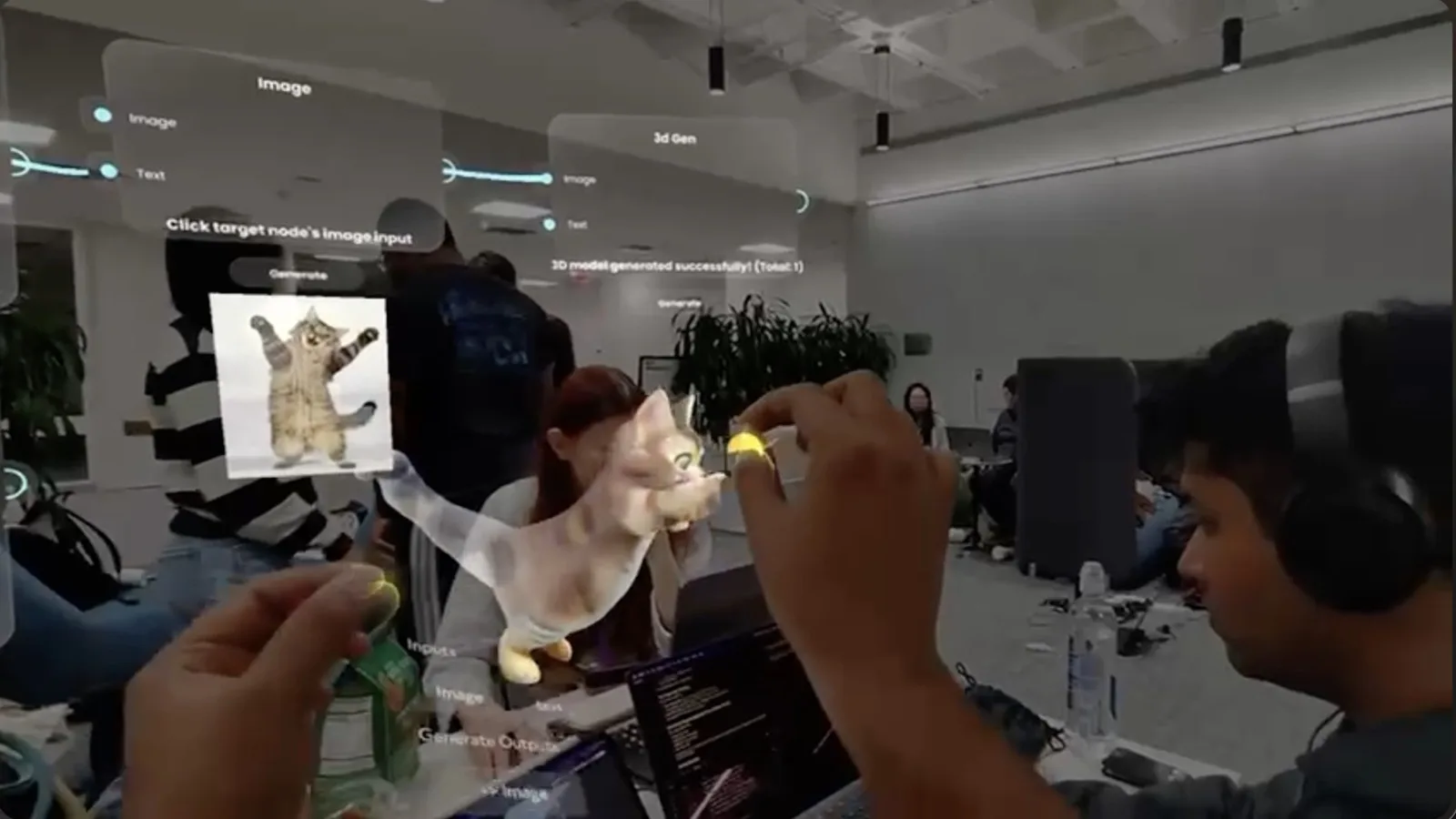
noodle's answer was to take the node graph off the screen and put it in the room. You build your AI workflow in the space around you. Nodes float where you place them. You connect them by reaching out and drawing a line between outputs and inputs with your hand. There is no mouse. No trackpad. Your hands are the interface, the way they always should have been for this kind of work.
The data flows animate between nodes in real time, so you can see what is happening as it runs, not by reading a log in a panel somewhere. When the output renders, it appears where you placed the output node, in the space between you and the work.
The experience clicked the moment we stopped thinking about the node graph as a UI and started thinking about it as a place you inhabit. You do not scroll or zoom to find a node. You turn around and walk toward it. That is only possible on glasses. That is exactly where the glasses earn their place.
What SnapOS gets right
Lens Studio for Spectacles defaults to world-anchored interaction. Content you place in the scene stays where you put it relative to the physical environment, not relative to the camera. The system tracks the world. You design for the world. If you work with that assumption instead of against it, experiences start to feel natural almost immediately.
The interaction model in the Spectacles Interaction Kit gives you three gesture modes: ray-pointing for targets at a distance, direct pinch for objects within reach, and direct poke for fingertip contact with close surfaces. These are not arbitrary choices. They map to how people naturally reach for things in space. Ray-pointing is how you gesture at something across a room. Direct pinch is how you pick something up. The mapping makes the interaction feel intuitive faster than custom gesture systems tend to.
The scripting layer exposes the things that matter for spatial experiences: plane detection, hand joint positions, world anchor persistence, voice command integration. The APIs are well-documented and the community around Lens Studio is active enough that most problems have been encountered before.
None of this means it is without friction. But the friction points are in the right places. The platform pushes you toward world-anchored, hands-free, ambient experiences. If you push back and try to build something screen-shaped, it resists. That resistance is useful. It is telling you something about what works.
Three things that are still genuinely hard on Spectacles
Content legibility at the edges of the FOV
The comfortable reading zone on Spectacles is the centre 20-25 degrees. Content placed toward the outer edge of the 46-degree FOV sits in peripheral vision. Users can see it, but it is harder to resolve and it tends to feel like clutter rather than information. In the noodle build, we tested placing secondary node information (connection metadata, parameter labels) in the peripheral zone to keep the primary workspace clean. Users consistently missed it or found it distracting. We moved everything into the central zone and let the primary node view carry more weight.
Text also gets harder to read as it moves further from the viewer in depth. Finer font weights at distance become hairlines against a complex real-world background. The fix is heavier weights (500-600) for anything placed more than about 1.5 metres from the user, and a subtle background panel behind text rather than relying on colour alone for legibility.
Persistence and plane detection reliability
Anchoring content to a specific physical location requires plane detection to find and track the surface accurately. On Spectacles, plane detection works reliably on large, flat, well-lit surfaces. It gets less reliable on textured surfaces, in lower light, and when the detected plane is at an angle to the viewer. In the noodle build, we wanted nodes to stay exactly where you placed them in the room as you moved around and through the graph. In testing, nodes occasionally drifted a few centimetres as plane detection updated. On a phone AR experience, a few centimetres of drift is imperceptible. In glasses, where the content looks like it actually exists in the room, a node that shifts position is immediately noticeable and breaks the sense that the graph is a real spatial object.
The solution was to anchor to the plane but add a stabilisation buffer: content waits for detection confidence to cross a threshold before snapping to a new position. The result feels locked in space rather than floating and tracking in real time.
Battery and session design
Forty-five minutes of continuous use is a real constraint, and it shapes what you can build. Experiences designed for marathon sessions do not fit the platform. For noodle, the sessions that worked in testing were 15-20 minutes: open the workbench, build a workflow, run it, take the glasses off. The constraint forced us to make the experience fast to enter and fast to produce something useful. That pressure turned out to be good design direction, not just a hardware limitation.
Battery also means that intensive visual experiences drain faster. Rich particle effects, complex scene lighting, continuous hand tracking at high frequency: all of these draw power. Design for sessions, not for continuous use. Know exactly what the beginning, middle, and end of your experience are before you build anything.
The moment something worked
Late on the second day. We had a version of noodle that was technically functional but still felt like a demo with nodes. The connections worked. The AI outputs rendered. The hand gestures mapped correctly.
One of my teammates put the glasses on and built a workflow from scratch, not to test it, to actually make something. They reached out and connected an image input node to a generative model node, dragged the output to a rendering node, and ran it. The result appeared in the space between them, floating exactly where they had placed the output node.
They stood inside their own workflow and watched it run. That is something you cannot do on a screen. You cannot walk through your node graph on a monitor. You can only look at it. On glasses, you inhabit it.
At some point they stopped noticing they were wearing the glasses. The technology became invisible. That is the target state for everything I build on this platform now: the moment when the medium disappears and only the work is left.
And something else mattered in that moment: the glasses were working with no phone in sight. No cable. No companion app open on a table nearby. The experience was complete, self-contained, and running on the device they were wearing. That device independence is what I did not expect to feel so significant. Previous AR hardware I had built for required a tethered phone or a connected machine. With Spectacles, you walk away. The work stays with you.
The principle that held across the whole build
The glasses became useful the moment we stopped thinking about the node graph as a UI and started thinking about it as a space to inhabit. Everything I have built on Spectacles since has started from the same question: does this have to exist in the world, or would it be easier on a screen? If the answer is a screen, build it on a screen. If the answer is the world, build it for glasses.
This applies to every project I have built on Spectacles since, and I expect it to apply to every platform that follows.
Five rules for developers starting on Spectacles now
Build the simplest version on day one and wear it. Not demo it. Wear it. Walk around with it on. The embarrassment of that early version teaches you more than a week of planning in Lens Studio. The things that break, the interactions that feel wrong, the legibility issues: none of them are visible in the simulator. They are only visible on your face, in a real space.
Anchor everything to the world, not the camera. If your first instinct is to lock something to the screen, stop. Ask where this element would live if it were a physical object in the room. That is where it should live in the experience. Camera-locked UI is the spatial equivalent of holding a sign in front of someone's face.
Use audio before you reach for more visual UI. If you find yourself adding a label or a panel to explain something to the user, try replacing it with a short voice prompt first. Audio confirmation and guidance consistently outperformed visual onboarding in our user testing. The display is valuable, but it is not always the clearest channel available.
Remove before you add. The instinct when something is not working is to add more: more context, more guidance, more visual feedback. On Spectacles, the instinct should be the opposite. What can be removed? What can be implied rather than stated? The experiences that feel natural are the ones with the least on screen.
Design for a 10-minute session explicitly. Know what the beginning, middle, and end of your experience are. What does the user do first? What signals completion? An experience designed to that length is a better experience. The constraint removes ambiguity and forces clarity about what the core interaction actually is.
The instincts built now transfer to every platform that follows
Snap Spectacles is not the final form of smart glasses. The FOV will get wider. The battery will last longer. The plane detection will get more reliable. The form factor will get lighter. All of that is coming, from Snap and from other platforms.
But Spectacles is the most capable publicly available developer platform right now. The lessons from building for it transfer directly. World-anchored thinking. Restraint as a design discipline. Audio as a primary output channel. Session-length experience design. These are not Spectacles-specific patterns. They are spatial computing patterns, and they will apply to whatever platform the category produces next.
The developers who are building for Spectacles today are building the instincts and the vocabulary for the platforms that follow. That is why the embarrassing early versions matter. That is why the moment when the glasses become invisible is worth chasing. The category is real. The work being done now is the foundation.
See the full build at the noodle case study. If you are building for Spectacles or thinking about it, get in touch.
Frequently asked questions
Do you need a Snap Spectacles developer kit to start building?
You can start in Lens Studio without the physical kit. The simulator gives you a reasonable approximation of the FOV and interaction model, and it is the right place to block out your experience before putting it on hardware. That said, the simulator cannot replicate the real-world legibility challenges, battery constraints, or the physical reality of wearing the glasses in a space with variable lighting and background clutter. The kit matters most for testing and iteration. Build your first version in the simulator, then get it on the hardware as early as possible. The gap between what looks good in software and what works on the device is significant.
How is Lens Studio for Spectacles different from Lens Studio for Snapchat?
The tools share a foundation but the output and interaction model are completely different. Snapchat Lenses run on a phone camera: you are compositing over a live video feed, with touch interaction and a screen as the output. Spectacles Lenses run in a 3D spatial environment: the user is physically inside the experience, content exists in world space, and interaction is through hand tracking and voice. The scripting APIs differ in what they expose (6DoF tracking, hand joints, plane detection, world anchors), and the performance constraints are tighter on-device. If you have built Snapchat Lenses, the Lens Studio interface will feel familiar, but the mental model for spatial design is different enough that you should treat it as a new skill.
What kind of projects work well on Snap Spectacles?
Experiences where the user needs their hands free and their eyes on the real world rather than a screen. Spatial creative tools (noodle is a direct example: a node-based AI workbench you build and navigate in 3D space with your hands), spatial navigation, hands-free reference during physical work, interactive product demos at events, and shared spatial moments between two people in the same location. Projects that struggle on Spectacles are those requiring sustained reading, complex menu navigation, or fine visual precision at the FOV edges. The 46-degree canvas is a powerful platform for ambient, spatial, hands-free interaction. It is not the right platform for experiences that would be easier on a phone.
How do you get access to the Snap Spectacles developer programme?
Apply through the Snap AR developer portal. Snap reviews applications and approves access to the Spectacles developer kit, which includes the hardware, Lens Studio with Spectacles support, and documentation. The process is not instantaneous: plan for a wait after applying. If you are a studio or agency with a specific project in mind, having a concrete use case in your application helps. Snap has also made dev kits available through hackathons including MIT Reality Hack, which is how we first got hardware access to build noodle.
Brands sometimes confuse a Snap lens (phone-based Snapchat filter) with a Spectacles lens. They share a build tool but are different platforms with different briefs. For a clear comparison, see Spectacles lens vs Snap lens.
Insights newsletter
Smart glasses, AR campaigns, spatial computing.
Straight to your inbox. No noise.
SubscribeBuilding something for Snap Spectacles?
We have been in the platform since early access. We would like to hear about it.
Start a project