AR in one sentence
Augmented reality adds digital things to the real world. A digital label floating over a physical object. A 3D character standing on your kitchen table. An arrow pointing you somewhere when you look in that direction. That is AR. The digital layer exists in your physical space, not on a separate screen.
Everything else, phone AR and wearable AR included, is a question of how you see that layer. The answer changes everything about what the experience can actually be.
Phone AR vs wearable AR: the key difference
Phone AR works like this: you hold up a camera, look at a screen, and the AR is happening in a rectangle you are holding. Your hands are occupied. Your eyes are split between the screen and the world. Tilt the phone slightly, and the experience breaks. Lower it, and the AR disappears entirely.
Wearable AR works differently. The digital layer is in your field of vision directly. You are not looking at a device that shows the world with AR on top. You are looking at the world, and the AR is there. Both hands are free. Both eyes see the environment naturally. The experience exists around you, not in front of you.
That single difference, hands free versus one hand occupied, sounds small. It changes what the experience can ask of the person using it.
Holding a screen
Hand occupied holding device
Eyes split between screen and world
Arm tires after 30 seconds
AR disappears when you lower phone
Wearing the experience
Both hands completely free
Eyes look directly at world
Natural posture maintained
AR persists as you move
What wearable AR actually looks like
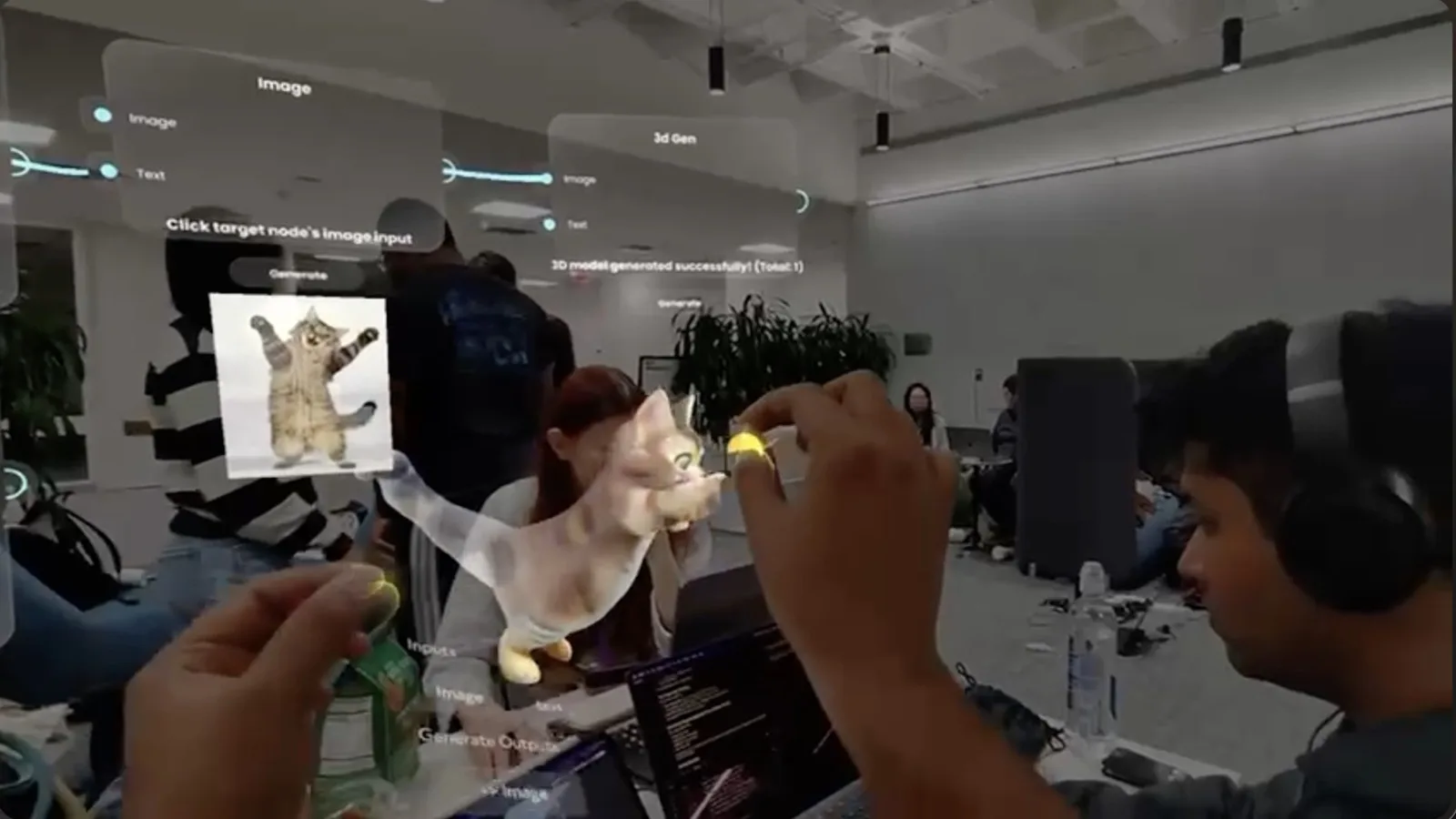
When you put on AR glasses, you see the real world as normal. Overlaid on that, depending on what experience is running, you might see floating 3D objects anchored to surfaces. Text labels appearing above physical objects. Spatial interfaces you navigate by looking or pointing your hand. AR content that scales and rotates correctly as you walk around it.
It does not fill your entire field of vision. Current smart glasses have a limited display area. Think of a floating rectangle at roughly reading distance, not a wraparound cinema. What is inside that display area, though, feels placed in the world. When you step to the side, the AR object does not move with you. It stays where it was. That anchoring is the part that no phone screen can replicate.
Why the interaction model changes everything
Phone AR interaction is built around touch. You tap, swipe, pinch, and hold the camera steady. The entire design assumes a flat glass surface that registers finger contact.
Wearable AR has no touchscreen. Interaction happens through hand gestures, voice commands, and head movement. On Snap Spectacles, you reach toward things, pinch to select, and point to aim. The absence of a touchscreen is not a limitation. It is the entire point.
An experience designed for tapping a screen does not work when your hands are in open air. This is why direct ports of phone AR to smart glasses almost never work well. The interaction model is different from the ground up, and the experience has to be designed for it from the start.
What wearable AR is used for today
Practical use cases that already exist, not hypotheticals:
- Spatial brand activations at events, where guests wear glasses and walk through an AR experience in a physical venue
- Hands-free product demos, where both hands can handle the physical product while AR information floats nearby
- AR games and experiences in physical spaces, where the room becomes part of the play area
- Spatial AI tools, like noodle at MIT Reality Hack 2026, which let you build and interact with generative AI outputs using your hands in open space
- Try-on and visualisation experiences that do not require the user to hold a phone up throughout
- Navigation overlays for industrial and training contexts where operators need their hands free

Does wearable AR work the same on all smart glasses?
No, and this is an important distinction. Not all smart glasses are the same thing.
Snap Spectacles
Renders actual visual overlays in the lens. This is wearable AR. You see digital content placed in your physical environment, anchored to surfaces and tracked as you move.
Meta Ray-Ban
No display. Camera captures what you see, and the glasses can hear you and respond with audio. You cannot see visual AR overlays. These are audio-first devices, not wearable AR in the visual sense.
Only glasses with an actual AR display can show visual wearable AR. If a device has no screen in the lens, it cannot put digital objects in your field of vision.
Beyond those two, the landscape includes Xreal (Air 2, One), tethered AR glasses that work as a private floating screen connected to a phone or laptop, good for media and productivity but not for world-anchored experiences. Brilliant Labs Frame is a monocular AR lens built around an AI assistant. Enterprise options from Vuzix and Epson focus on hands-free workflows in warehouses and field service. All of these use the term "AR glasses" but they deliver very different things. If you are evaluating wearable AR for a brand activation or creative build, the relevant question is always: does the device anchor digital content to the real world? If not, it is a different category. For the full breakdown of what each type can and cannot do, see the plain-English guide to smart glasses.
Is wearable AR ready for brands?
Honestly: not for mass-market campaigns. The hardware is not in enough pockets yet for a brand to run a wearable AR activation and expect everyone to join in. That moment is still ahead.
But for events, launches, and brand activations where you control who wears the glasses? Yes, it works now. You bring the glasses, guests put them on, and the experience runs. The controlled environment solves the distribution problem. The experiences that come out of that setup are significantly more memorable than anything a phone can deliver, because both hands are free and the AR exists in the room with the audience.
If you want to understand what this looks like in practice for your brand, the wearables section covers it in full.
Frequently asked questions
What is wearable AR in simple terms?
Wearable AR is augmented reality experienced through a device you wear on your face, typically smart glasses. Instead of holding up a phone to see digital objects overlaid on the world, the digital layer appears directly in your field of vision. Your hands stay free, your posture stays natural, and the experience follows you as you move.
Can wearable AR work without an app?
On most platforms today, a Lens or experience needs to be loaded onto the glasses either through a companion app or developer toolchain. Snap Spectacles use Snap's AR platform and Lens Studio. There is no universal wearable AR standard that works across all devices without any setup, though web-based approaches are emerging. For events and activations, the experience is typically pre-loaded before guests put the glasses on.
Is wearable AR the same as VR?
No. VR (virtual reality) replaces your view of the world entirely with a digital environment. Wearable AR adds digital elements on top of the real world you can still see. On Snap Spectacles, you look through the lenses and see your actual environment, with AR content overlaid on it. On a VR headset like Meta Quest, the real world disappears entirely. Mixed reality (MR) sits between the two, often on devices that blend a passthrough camera feed with digital content.
Why can't I just use my phone for AR instead?
You can, and for many use cases phone AR is the right choice because everyone already has a phone. The difference is the interaction model. Phone AR requires one or both hands to hold the device, your eyes split attention between the screen and the world, and your arm tires quickly. Wearable AR keeps both hands free and puts the digital layer directly in your vision. For experiences where hands need to be doing something, where the user is moving around a space, or where a 30-second arm-raised limit would break the experience, wearable AR works where phone AR doesn't.
What hardware do I need for wearable AR?
You need smart glasses that include an actual AR display, not just cameras and speakers. Snap Spectacles (5th generation) are the primary platform for building and experiencing wearable AR at events and activations today. Meta Ray-Ban glasses have cameras and audio but no display, so they cannot show visual AR overlays. Apple Vision Pro can display AR but is a bulkier headset, not glasses. For brand experiences and events, Snap Spectacles are currently the most practical option.
Insights newsletter
Smart glasses, AR campaigns, spatial computing.
Straight to your inbox. No noise.
SubscribeWant to see wearable AR in action for your brand?
See what is possible for events and activations, or start a conversation about your next project.