More is happening in that frame than you would think
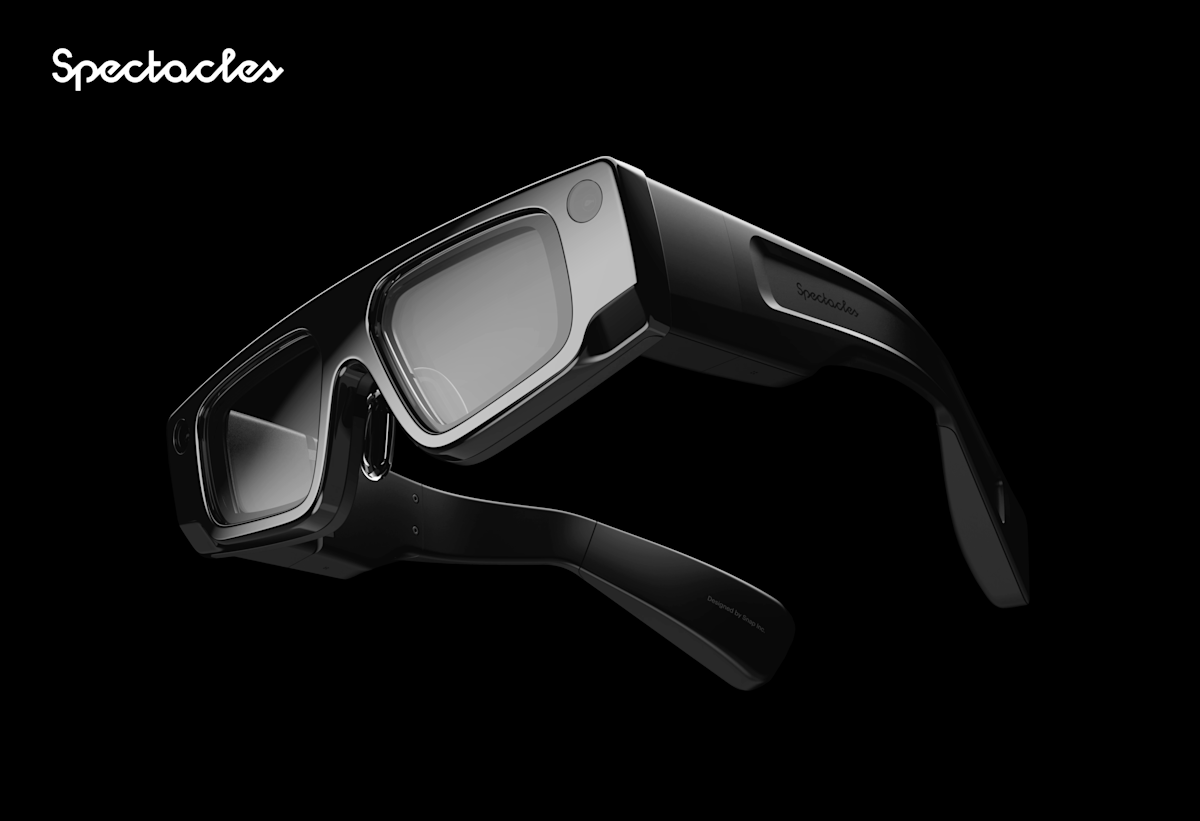
Smart glasses look deceptively simple from the outside. A frame. Two lenses. Maybe a slightly thicker temple. But packed into something that weighs a few hundred grams and sits on your nose is a camera array, a processor, an inertial measurement unit, a display system, a battery, Wi-Fi and Bluetooth radios, a speaker, and, on AR devices, a projection system and a waveguide optical stack. All running in real time, all drawing as little power as possible, all fitting into the space where the frame and lenses of a normal pair of glasses would sit.
Understanding how these components work together explains almost everything about why smart glasses feel the way they do to use, why battery life is short, why the field of view is constrained, and why designing for this medium requires a completely different approach than designing for a phone screen.
The camera: the device's eyes
Smart glasses carry at least one forward-facing camera, and AR devices like Snap Spectacles carry multiple. The cameras do two distinct jobs that are easy to conflate but are actually separate.
The first job is environment mapping: understanding the physical space around you so that digital content can be placed correctly within it. When you put a virtual object on a table, the glasses need to know where the table surface is, how far away it is, and how it is oriented. This requires continuous processing of camera feeds and is one of the most computationally expensive things the device does.
The second job is hand tracking: seeing your hands and turning their position and movement into input. This is also camera-based rather than controller-based, which is why no smart AR glasses ship with a physical remote or gamepad. Your hands are the input device.
Camera hardware is also what separates AR glasses from camera glasses. On Meta Ray-Ban, the cameras exist purely for capture: taking photos and video to share. On Snap Spectacles, the cameras are doing active spatial work whether you are recording anything or not.
The waveguide display: how you see the AR layer
This is the component most people have never heard of and the one that makes true AR glasses possible. A waveguide is a thin, transparent optical element, typically glass or a polymer material, that guides light across its surface using a combination of internal reflections and microscopic diffraction gratings etched into the material.
Here is what that means in practice: a small projector, embedded in the temple of the glasses, fires light at an angle into the edge of the waveguide lens. That light travels across the lens and is gradually redirected outward toward your eye by the surface gratings. Because the process uses the waveguide's internal geometry rather than blocking the lens material, the lens stays transparent. You can see through it clearly. But simultaneously, the projected light reaches your eye and appears as a digital image floating in space.
The result is both layers at once: the real world through the transparent lens, and the digital content projected onto it. Neither obscures the other. The AR layer sits in front of the real world, at a focal depth that the projector and waveguide combination is tuned for, typically at a comfortable reading distance of around one to two metres.
Waveguide optics are the primary reason AR glasses are expensive to manufacture. Etching the precise surface gratings at the tolerances required is technically difficult, yield rates are lower than for conventional optics, and different viewing angles require different grating geometries. The display field of view on current consumer devices (around 46 degrees diagonal on Spectacles) is constrained partly by the physical limits of what waveguide panels can achieve at this form factor and price point.
The processor: running it all in real time
Everything described so far requires significant compute to execute: simultaneous camera feeds, spatial mapping, hand tracking, rendering 3D content at a frame rate that feels smooth, and managing the display pipeline. All of this runs on a processor embedded in the glasses frame.
The constraint is thermal management. A processor running hard generates heat. In a device sitting on your face, that heat has nowhere to go. The processor cannot throttle up the way a desktop or even a phone can, because it will become uncomfortable to wear within minutes. This is one reason spatial mapping and rendering pipelines on smart glasses are heavily optimised compared to the same workloads on a laptop or phone.
Snap Spectacles use Qualcomm's extended-reality chipset, designed specifically for AR devices with these thermal and power constraints in mind. It combines the main processor with a dedicated neural processing unit (NPU) for running the machine learning models used in hand tracking and environment understanding, offloading those workloads from the main CPU so the thermal budget stays manageable.
Spatial sensors and environment understanding
Beyond the cameras, AR glasses carry an inertial measurement unit (IMU): an accelerometer and gyroscope that track how the glasses move through space many hundreds of times per second. The IMU is what makes head-tracked content feel stable. When you turn your head, the digital content does not drift; it stays fixed in the world, because the device knows your head is moving, not the object.
The combination of camera-based environment mapping and IMU-based head tracking is called simultaneous localisation and mapping, or SLAM. SLAM answers two questions at once: where is the device in space, and what does the space look like? The device builds a rough 3D model of the room in real time and tracks its own position within that model. When you walk around a virtual object, it stays in place because the glasses are continuously updating their understanding of where they are in relation to the object's fixed position in space.
Hand tracking: interacting without a controller
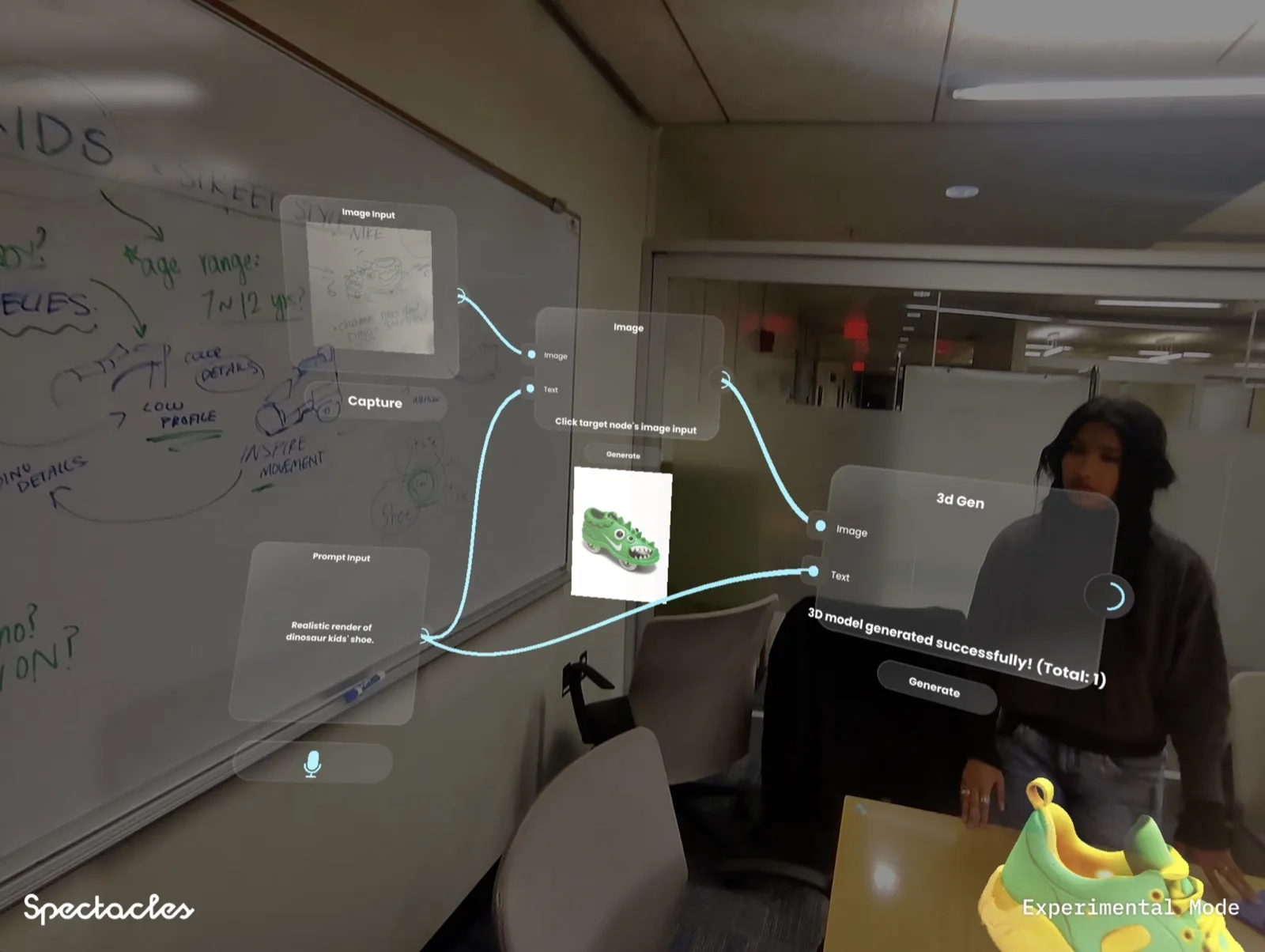
With no keyboard, mouse, or touchscreen available, hand tracking is the primary input method for AR smart glasses. The onboard cameras see your hands, and a machine learning model running on the neural processing unit maps 21 keypoints per hand (fingertips, knuckles, palm, wrist) many times per second.
From those keypoints, the system can recognise gestures: a pinch (thumb to index fingertip) is typically the primary selection gesture, equivalent to a tap or click. A grab gesture can pick up virtual objects. A palm-up pose can open a menu. The exact gesture vocabulary is defined by the experience developer using the platform SDK.
The latency of hand tracking is critical to whether interactions feel natural. At 20ms or under, gestures feel like direct manipulation. At 50ms or over, there is a visible lag between the physical gesture and the digital response that breaks the illusion. Current devices sit in the 15 to 25ms range for tracking, though rendering pipeline adds additional delay on top.
Hand tracking works best in conditions the cameras can clearly see: good lighting, hands in front of the body and within the cameras' field of view. Occlusion (one hand hiding the other) is handled by prediction from the recent position history, but it degrades tracking quality. This shapes how developers design interactions: most good smart glasses UX keeps the interaction hand forward and visible, and avoids complex two-handed gestures that require precise simultaneous tracking of both.
How it all fits together
In a single second of active use, here is what the glasses are doing: reading camera frames, running SLAM to update the spatial map, running hand tracking to identify gesture input, processing any developer-defined logic in response to that input, rendering the updated 3D scene, and feeding the rendered output to the waveguide projector, all while managing thermal output, maintaining the Wi-Fi or Bluetooth connection, and updating the IMU data stream. Then repeating, sixty or more times per second.
This is why the battery lasts thirty minutes on active AR use. It is also why optimising experiences for this hardware requires thinking differently than optimising for a phone app. You are not writing software for a device that can idle most of its components when nothing is happening. Every frame, every component is active.
When the approach changes: Xreal
Not all AR glasses work this way. Xreal Air and Air 2 take a different architectural approach that trades spatial intelligence for a simpler, lower-power display system.
Xreal glasses are tethered: they connect physically to a phone, laptop, or game console via USB-C and use that device's processor for all compute. The glasses themselves contain only a micro-OLED display and optics: a binocular display that creates a floating screen image in front of your eyes. There is no onboard spatial mapping, no hand tracking, no environment understanding. The glasses display what the connected device sends to them.
The result is a much longer battery life (running off the connected device) and a much simpler use case: a private floating screen for video, gaming, and productivity. It is not world-anchored AR. You cannot place a virtual object on a physical table and walk around it. But for the use cases Xreal targets (watching a film, working on a plane, gaming in a small space), the display quality and form factor are genuinely compelling.

Why hardware constraints shape what you build
Every element of the hardware chain above has implications for how experiences are designed.
- A 46-degree field of view means content placed at the edges of the display will be outside it when the user looks slightly to one side. Design for the centre, not the perimeter
- 30-minute battery life means event activations need rotation logistics: dedicated charging stations and enough glasses to cover the session in rotation
- Hand tracking accuracy degrades in low light and with occlusion. Avoid experience designs that rely on precise two-handed gestures in varied event lighting conditions
- SLAM accuracy depends on surface texture. Environments with plain white walls and no visual features will cause spatial anchors to drift
- Thermal throttling means processor-intensive effects (particle systems, complex physics) hit a ceiling faster than on desktop hardware
None of these are reasons to avoid building for smart glasses. They are constraints to design within, in the same way that small screens and no keyboard shaped the entire vocabulary of mobile app design in the early years of the smartphone. The medium is early. The constraints are specific. And the experiences possible within them are already compelling.
Frequently asked questions
Want to build something for smart glasses?
Whether it is a brand activation, a spatial tool, or an experience worth running at an event, the studio builds for Spectacles and the wearable AR ecosystem.