What "event navigation and activation" actually covers
Every event producer eventually gets the same brief from a client or their own team: "can we do something with AR or smart glasses." The honest answer is that the brief is rarely about a device. It is about two separate jobs. The first is helping attendees find their way around the venue and know what is happening when. The second is giving them a reason to stop, engage, and remember a specific point in the space. Format choice is downstream of which job you are actually solving.
In short: brief a mobile companion app for wayfinding and schedules, place AR activation points at checkpoints around the venue for engagement, and treat smart glasses as an emerging option for a specific premium moment rather than the default across the whole crowd.
This guide walks through all three, in the order most events actually need them, with the constraints that matter for a producer: crowd logistics, on-site tech reliability, and how much setup time you realistically have before doors open.
Mobile companion apps: the default for event navigation
A custom companion app is the practical starting point for almost every multi-zone event, whether that's a conference, a festival, a trade show floor, or a brand activation across several rooms. Every attendee already has the hardware in their pocket. There is no device to distribute, charge, collect, or sanitise between users. The app can carry the schedule, a live map, session reminders, and camera-based AR wayfinding overlays in one place, and it works the moment someone downloads it, whether or not any AR content is loaded.
The wayfinding layer itself has two tiers worth briefing separately. A static map with a "you are here" pin and turn-by-turn directions covers most needs and is the cheaper, more reliable build. A camera-based AR overlay, where the phone camera shows directional arrows or labels floating over the real corridor or hall in front of the attendee, is a genuine upgrade for large or confusing venues, but it depends on stable indoor positioning and should be tested in the actual venue, not just a similar one, before you commit to it as the primary navigation method.
The constraint that catches producers out is connectivity. A companion app built assuming constant live data will fail the moment a few thousand phones hit the venue wifi at once. Maps, schedules, and any activation content the app carries should be cached on first load, so the core navigation function keeps working even when the network does not. Treat offline resilience as a requirement in the brief, not a nice-to-have added at the end.
See our guide to AR at live events and festivals for how the same network and throughput constraints play out for on-site activations more broadly.
AR activation points: turning the venue into checkpoints
Once wayfinding is solved, activation points are how you give the venue itself something to do. The pattern is simple: place a small number of physical markers, QR codes, or GPS-triggered zones around the space, and each one unlocks a short AR moment through the companion app or a browser-based scan. A branded 3D object appears over a stage. A hidden character shows up next to a sponsor's booth. A photo frame overlay appears at the entrance for a shareable moment. None of it requires the attendee to own or wear anything beyond their own phone.
Checkpoint-style activations solve a problem that a single big installation cannot: they spread foot traffic across the venue instead of creating one queue at one spot. A trail of 4 to 8 activation points across a conference floor or festival ground gives attendees a reason to walk the whole space, gives sponsors distributed visibility instead of one crowded booth, and gives your team a simple completion mechanic, "visit all five points," that works for a leaderboard, a prize draw, or a badge collection without any extra build.
What each activation point actually needs
A trigger (QR code, image marker, or GPS geofence), a short AR moment that loads in under three seconds, a clear single-step instruction on physical signage at eye level, and a completion signal the app can log. Keep each moment to well under a minute of engagement: throughput at a busy checkpoint matters more than depth at any single one.
The same 60 to 90 second engagement rule that applies to festival AR activations applies here.
Cost and setup time scale with the number of points, but not linearly. Building the app shell, the tracking approach, and the first activation is the expensive part. Every additional checkpoint after that is cheaper, because it reuses the same infrastructure. This is why a producer briefing a single isolated AR moment often ends up paying nearly as much as briefing a full trail of five, and why it is worth deciding on scope for the whole venue before committing to just one point.
Physical setup and testing on-site should be budgeted as its own phase, not folded into general event load-in. Each checkpoint needs a live walkthrough in the actual lighting and signal conditions of the day, not just the conditions from a site visit weeks earlier. Signage placement matters as much as the AR content itself: a marker in a thoroughfare where people are walking through gets ignored, while the same marker at a spot where foot traffic naturally pauses gets used.
Smart glasses as an emerging option, not the default
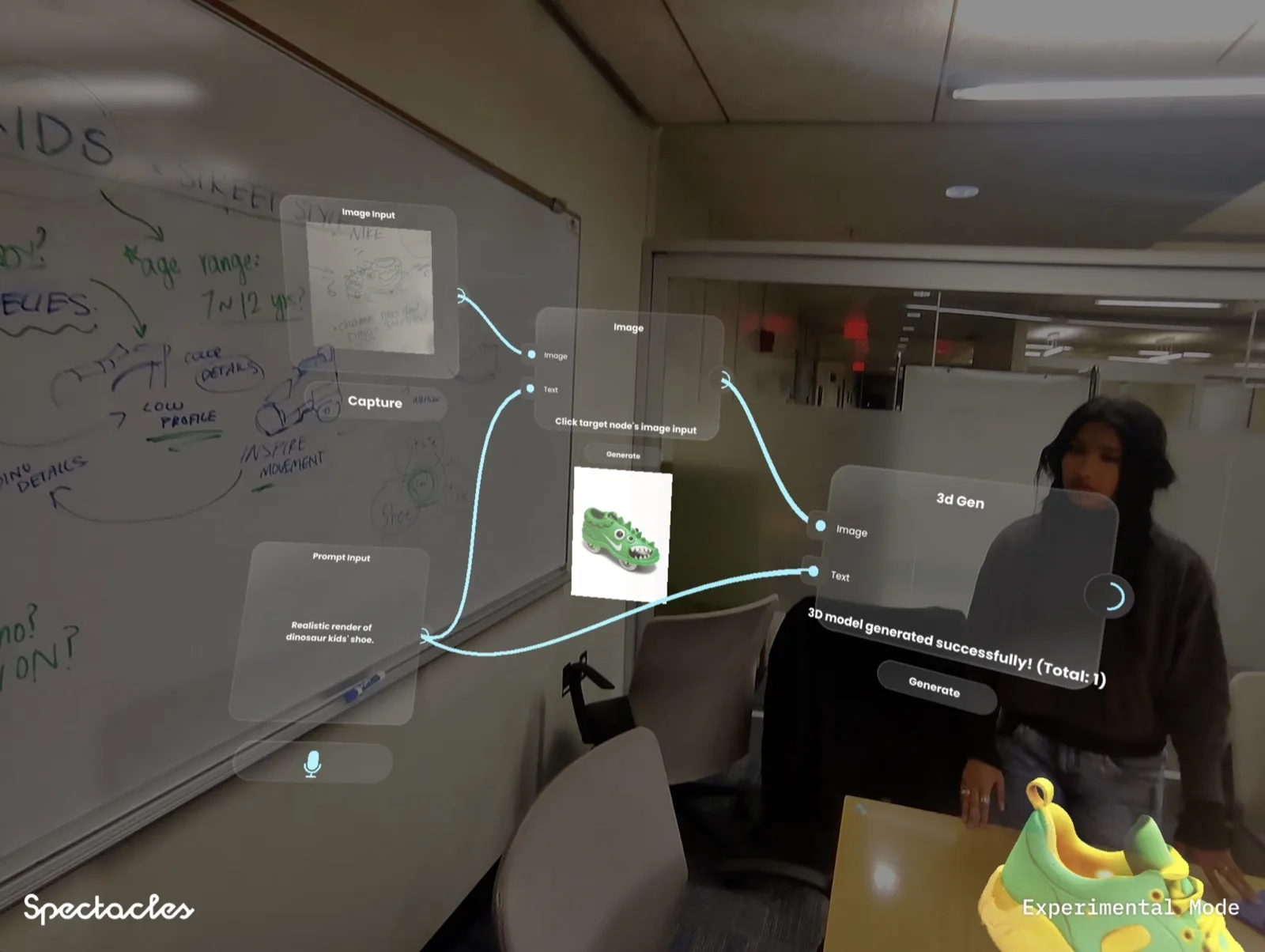
Smart glasses solve a real problem that phones cannot: hands-free navigation and overlays that sit directly in the wearer's view without them looking down at a screen. For a press preview, a VIP walkthrough, or a controlled brand moment with a small, supervised group, that is a genuine advantage. It is not yet a practical way to run navigation for a crowd of any real size.
The logistics are the limiting factor, not the technology. Every pair of glasses at an event is a device that has to be issued, tracked, charged between uses, and sanitised for the next wearer. Battery ceilings on current AR glasses sit well under a full event day of continuous use. None of that is a problem a companion app running on attendees' own phones ever has to solve, because there is no fleet to manage.
We know this format from the inside. Noodle, a spatial AI workbench we built on Snap Spectacles, won its category at MIT Reality Hack 2026. It is a hands-and-voice creative tool, not a navigation product, but building it taught us exactly where Spectacles-class hardware is strong right now: a bounded, single-user or small-group session with real supervision, not an unattended public-facing installation. That is the honest scale for smart glasses at events today, a premium demo moment for a defined audience, while the companion app and activation points carry the actual crowd. For the deeper platform comparison, see our wearables pillar page and our piece on smart glasses at festivals.
Choosing the right mix for your brief
Most events do not need to choose one format. They need to sequence the three correctly, matched to what each part of the day actually requires.
Mobile companion app
No hardware to distribute, works for every attendee's own phone, carries schedule and maps alongside AR wayfinding. The default for any multi-zone or multi-day event.
AR activation points
Physical checkpoints that unlock AR moments via QR or geofence. Spreads foot traffic, gives sponsors distributed visibility, works through the same companion app or a browser scan.
Smart glasses
Hands-free overlays for a bounded premium moment: press preview, VIP walkthrough, brand demo. Not yet practical for unattended or mass-attendance navigation.
The mistake we see most often is producers evaluating these as competing options when they are actually complementary layers. A conference briefs the companion app for wayfinding, adds three or four activation points at sponsor zones for engagement, and reserves a single pair of smart glasses for a demo station at the innovation stage where a staff member supervises every session. That sequencing gets the crowd logistics right without asking any one format to do a job it is not suited for.
Setup, staffing, and on-site reliability
Whichever mix you brief, the same three risks show up on the day: network congestion, unclear instructions, and no plan for the first wave of users. A dedicated event network for anything running live data, tested at expected attendance density rather than an empty venue, removes the most common failure mode outright. Physical signage with a single-step instruction at eye level does more to drive usage than any amount of explainer copy in the app itself. And one staff member near each activation point for the first hour, helping the first few attendees succeed, sets the pattern that the rest of the crowd follows on their own.
Build in the offline fallback before the event, not during it. If the companion app or an activation point depends on a live connection that fails under load, the whole navigation layer goes down with it. Cached maps and pre-loaded activation content mean a network hiccup becomes a minor glitch instead of a dead experience in front of a full venue. For a deeper look at proving these activations were worth the spend afterward, see our guide to measuring AR campaign ROI.
Frequently asked questions
What is the difference between a mobile companion app and smart glasses for event navigation?
A mobile companion app runs on the phone every attendee already has in their pocket. It handles wayfinding, schedules, and camera-based AR overlays with zero hardware cost and no distribution problem. Smart glasses are a shared or loaned device, add hardware logistics and hygiene considerations, and suit small, premium, high-touch moments rather than mass attendance. For an event expecting more than a few hundred people, the companion app is the default; glasses are the exception for a specific VIP or press moment.
How much does an AR activation point cost to set up at an event?
A single scan-to-unlock AR activation point built into an existing companion app, including the AR content and the trigger, typically runs a few thousand dollars per checkpoint depending on content complexity. A multi-point trail across a venue costs more per point but less per point than one isolated activation, because the app shell, tracking setup, and testing are shared across all checkpoints. Signage, staffing, and printed materials are a separate line item and should be budgeted alongside the build.
Do attendees need to download an app for AR activation points at an event?
It depends on the format you brief. A dedicated companion app requires a download, which is worth it when the event runs multiple days or the app also carries the schedule, maps, and ticketing. For a single-day activation, WebAR accessed via QR code needs no download at all and works in the phone's browser, which is usually the better call when navigation is a secondary feature rather than the main reason people are there.
How long does it take to set up AR activation points at a venue?
Physical setup on-site, placing markers or confirming GPS zones and testing each checkpoint, usually takes half a day to a full day for a venue with 4 to 8 points, assuming the app and content were built and tested beforehand. Do not compress this to the morning of the event. Lighting, signal strength, and marker visibility all behave differently on-site than they did in testing, and every checkpoint needs a live walkthrough before doors open.
Are smart glasses ready to replace phone-based event navigation?
Not for mass attendance, and not yet for most briefs. Smart glasses solve a real problem, hands-free navigation and overlays, but distributing and managing a fleet of shared devices across thousands of attendees is a logistics problem phones do not have. Noodle, built on Snap Spectacles at MIT Reality Hack 2026, proved the format works for a focused, supervised experience. That is the right scale for smart glasses at events today: a bounded, premium moment, not the primary navigation layer for the whole crowd.
What happens if venue wifi goes down during an AR activation?
A well-briefed activation should not fully depend on live connectivity. Companion apps should cache maps, schedules, and activation content on first load so navigation keeps working offline. AR activation points built as WebAR need a dedicated event network rather than public wifi or cellular, because congestion from thousands of devices is the most common cause of failure on the day. Build the fallback into the brief before the event, not during it.
Insights newsletter
Smart glasses, AR campaigns, spatial computing.
Straight to your inbox. No noise.
Subscribe