What an AR mirror actually is
An AR mirror is a physical installation, not a social media filter. It consists of a large display screen, a camera positioned to capture the person in front of it, and software that tracks the body or face in real time and overlays virtual products onto the live feed. The output appears on the screen immediately, at life size, and it is visible to bystanders as well as the person using it.
This distinction matters because brands sometimes conflate AR mirrors with Snapchat lenses or TikTok effects. The phone formats are private, individual, and consumed through a small screen. An AR mirror is a public installation. It creates a crowd moment. That changes everything about how you design the experience and what you should expect from it.
How it works
The camera feeds a live video stream into tracking software. For body try-on, the software identifies skeletal landmarks (shoulders, waist, hips) and registers the virtual garment or product to those points at 60 frames per second. For face and head work (sunglasses, hats, makeup), facial landmark detection is used instead.
New to this? See the 40 second visual explainer: what is body tracking?
The virtual product is a 3D asset or a carefully masked 2D sprite rendered in real time. Lighting conditions in the asset are matched to the physical space so the overlay feels grounded rather than pasted on. The result is not photorealistic, but it is fast, responsive, and immediately readable.
A CMS layer sits behind the experience, allowing a brand team to swap product assets (different colourways, new SKUs, seasonal edits) without a developer rebuild. This is worth specifying in your brief from the start.
Why the physical format matters
The phone-in-hand try-on experience is inherently personal. You lift your phone, you see yourself, you put it down. An AR mirror is inherently social. The screen is large enough for people nearby to see what is happening. Someone watching a friend try on a jacket in AR is already engaged. They will wait for their turn. A queue forms. That queue is social proof, and it extends the time people spend at your activation.
There is also a confidence dynamic. Trying something on a large screen, in public, without having to touch or hold a phone creates a different quality of attention. People stand still. They look properly. They react. These are the conditions that generate content creation: people film the moment because it looks good on their screen too.
Where AR mirrors work
Fashion and apparel
The clearest use case. A brand can show an entire collection through one installation without carrying physical stock. This is particularly valuable at events, press days, and pop-ups where stock management would otherwise be logistically difficult.
Beauty and cosmetics
Face-tracked AR mirrors let customers see a full makeup look applied in seconds. Lipstick shades, eyeshadow palettes, and foundation tones can be cycled through quickly. The activation becomes a recommendation engine: people find shades they like, photograph the result, and buy with confidence.
Accessories
Sunglasses, jewellery, headwear, and bags all work well. The asset scale is smaller, which means the tracking precision requirements are tighter. Brief your supplier accordingly and ask to see reference work at the asset category you need.
Event and festival activations
High footfall, time pressure, and a social context make festivals well-suited to AR mirror activations. Dwell time per person is shorter than in retail, so content design needs to be immediate: one product shown clearly, one action (photograph it), one outcome. Keep the flow simple.
How we built it: easyJet
A social AR lens and a physical AR mirror are the same technology in different form factors. Both use a live camera feed, real-time body tracking, and virtual product overlays. The lens delivers it through the phone screen; the mirror delivers it through a large-format installation screen. The brief logic, the content decisions, and the production discipline are identical.
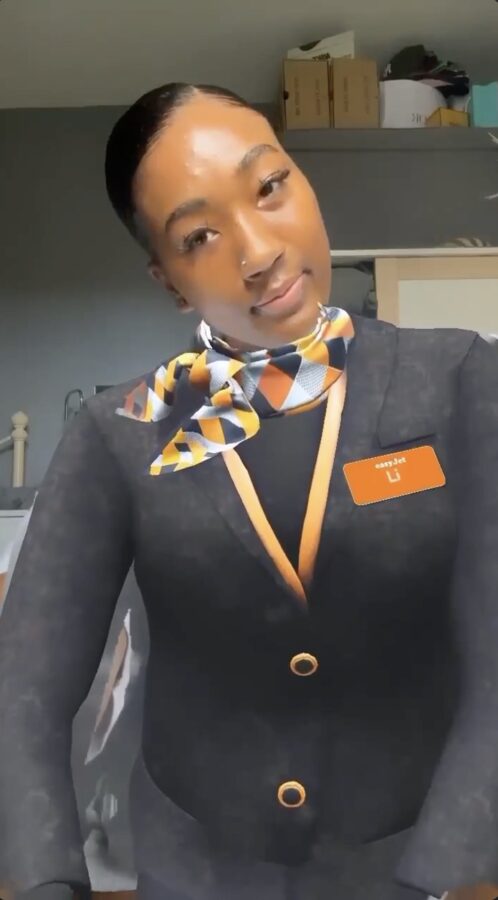
For easyJet, we built a body-tracked AR try-on experience designed around travel clothing. Users could see full outfits, styled for different trip types, overlaid onto their body in real time. The brief was centred on product discovery rather than fit guidance: the activation helped people imagine themselves on a trip, wearing the range, rather than asking them to assess technical fit.
The campaign reached 400,000 impressions with 45,000 shares, a share rate that reflects how naturally users sent it to friends planning trips together. Content was shared because the experience was personalised and immediately understandable, not because users were prompted.
The campaign is detailed in the easyJet case study. It is a useful reference for how to scope an AR try-on brief around a clear user outcome rather than a technical feature list.
What to include in your brief
A well-specified brief gets you a more accurate quote and avoids scope creep mid-production. Cover these four areas:
Physical space dimensions
Screen size, standing distance from the screen, and the space available around the installation. The screen size determines how large the body appears, which directly affects how convincing the overlay looks. Cramped setups where the user stands too close to a small screen undermine the experience.
Surface type and ambient lighting
Bright ambient lighting from behind the user creates a silhouette and degrades tracking accuracy. The ideal position for the user is lit from the front, against a neutral background. Share a floor plan and lighting spec so the installation can be designed around the actual environment.
Session duration and footfall expectation
A one-day pop-up with 500 visitors needs different capacity planning than a two-week retail installation. Session length per user affects queue design and whether you need attendant support. Specify both the expected footfall and the average engagement time you are designing for.
CMS requirements for product swapping
If the activation will run across multiple dates or locations with different product edits, you need a CMS that your team can operate without developer support. Specify this upfront. Retrofitting a CMS layer after build is expensive and delays deployment.
What AR mirrors cannot do
Be honest with yourself and your stakeholders about this before you brief it.
- Photorealistic fabric drape. Real-time rendering at 60fps cannot replicate the physics of how fabric falls and moves on a specific body. The overlay will look like a product reference, not a fitted garment.
- Accurate sizing. An AR mirror can show a product on a body shape, but it cannot tell you whether a size 10 will fit. Do not position the activation as a sizing tool.
- Hair and accessory occlusion. When a virtual hat needs to sit behind the user's hair, real-time segmentation degrades in complex lighting conditions. Test this with your actual product category and actual hair types before committing to the brief.
- High precision at distance. As the user steps further from the camera, tracking precision degrades. For large-format screens where users stand three metres back, body landmarks become harder to register accurately. Test the setup at the intended distance before sign-off.
Frequently asked questions
What is an AR mirror?
An AR mirror uses a live camera feed and body-tracking to overlay virtual products onto the viewer in real time. It exists in two forms: a physical installation (a large screen with a built-in camera, placed in a retail or event space) and a social AR lens (the same experience delivered through a phone screen on Snapchat or TikTok). Both share the same brief logic and production discipline. The physical installation creates a public, crowd-visible moment; the social lens delivers the same try-on mechanic to anyone with the app.
How long does it take to set up an AR mirror for an event?
Hardware installation on-site typically takes two to four hours. But the production lead time before the event is usually six to ten weeks: body tracking integration, product asset creation, UI build, and testing all happen before the hardware arrives. Brief earlier than feels necessary: the hardware setup is the quick part.
Can an AR mirror show accurate clothing fit?
No, and any supplier who says otherwise is overselling. AR mirrors show a visual overlay of a garment or product on a real body. They cannot accurately replicate fabric drape, weight, or precise sizing. The value is in inspiration and engagement, not fit guidance. For fashion specifically, frame it as a discovery tool, not a fitting room replacement.
Planning an AR mirror activation?
Share your brief and we will scope what is achievable, which tracking approach fits your product category, and what budget to plan for.
See the AR mirror technology in action →
Start the conversation